Professional Secure Password Removal Services
Regain Access. Restore Control.
If you’ve forgotten your computer password or find yourself locked out of your system, TN Computer Medics provides expert password removal services to help you regain access quickly and securely. Whether it’s a Windows login password, administrator account password, or BIOS password, we have the tools and knowledge to unlock your system and restore control without risking your valuable data.
Over 50% of data loss in IT environments is linked to user errors, with forgotten passwords being one of the most common culprits. Our services help recover your device and prevent this from happening.
How We Remove Passwords Securely?
Our process is designed with security and convenience in mind:
- Initial Diagnostic Assessment – We evaluate the login issue to determine the cause of the problem (forgotten password, locked account, etc.) and the best course of action.
- Verification of Ownership – For security reasons, we require proof of ownership before proceeding with password removal services.
- Execution of Password Removal – Using professional-grade tools, we will reset or bypass the password without risking data loss.
- Post-Repair Testing – After successfully removing or resetting the password, we test your system to ensure everything is functioning properly and you can log in without issues.
- Customer Follow-Up – We provide a comprehensive guide to help you set up a new password and ensure your system stays secure moving forward.
Our Password Removal Services
At TN Computer Medics, we offer a range of services to address various password-related issues. Here’s what we can help with:
Windows Login Password Removal
If you’ve forgotten your Windows login password, don’t worry! We have the expertise to reset or remove the password, granting you immediate access to your system. Our password removal tools are designed to be efficient, without compromising your data.
Microsoft reports that 64% of users forget their passwords every year, with password reset tools often being their go-to solution. We’re here to offer a fast and secure reset process.
Administrator Account Password Reset
Locked out of your administrator account? Our technicians can restore your admin privileges quickly so you can regain control of your system. No need to reinstall your operating system, our password reset methods are designed to keep your settings intact.
TechRadar indicates that administrator account issues account for nearly 30% of all computer login problems, highlighting the importance of professional reset services.
Password Bypass and Recovery
If you’ve lost access due to security questions, recovery keys, or an account lockout, we’ll bypass those hurdles securely and get you back into your system. Our recovery solutions are designed to be safe and quick.
BIOS/UEFI Password Removal
If you can’t access your computer due to a BIOS password, we can help! We use specialized tools to remove BIOS passwords and reset the settings, restoring full access to your system’s startup functions. (Proof of ownership is required for BIOS password removal).
The BIOS password protects access to your computer’s firmware settings and boot options. Without it, your system could be locked. Professional BIOS password removal is the most secure and efficient way to regain access.
Password Reset Without Data Loss
Unlike a system reset or factory restore, our method for password removal ensures that your files, programs, and settings remain unchanged. Whether it’s personal files, work documents, or photos, you won’t lose any data during the process.
Why Choose Professional Password Removal?
Passwords are designed to protect your privacy and data, but when you forget them or face a security lockout, they can become obstacles that halt productivity. While some people attempt DIY solutions, it can often result in more complications like data loss or corruption. Here’s why opting for professional password removal services from TN Computer Medics is the safest choice:
- Expert Technicians: Our team of experienced and certified technicians is trained in various methods for password removal, ensuring we offer the most effective solution for your specific needs. Whether you’re dealing with a forgotten Windows password, a locked administrator account, or BIOS password issues, we have the necessary tools and techniques to access your system safely.
- Comprehensive Password Reset Solutions: We provide a complete range of services, including password resets, account recovery, and password bypassing. We work with a variety of devices, from laptops to desktops, and cover operating systems like Windows 7, 8, 10, and 11, Mac OS, and more.
- Fast, Secure, and No Data Loss: One of the key concerns with DIY password removal is the potential loss of personal files, photos, and documents. At TN Computer Medics, we ensure password removal processes that preserve your data and settings. We offer solutions that avoid complete system resets, allowing you to keep your files intact.
- Affordable and Transparent Pricing: Our services are competitively priced to ensure you get value for money. We offer upfront pricing with no hidden fees, so you know exactly what to expect. Whether you need a simple password reset or a more complex solution, we will provide a clear estimate before beginning work.
TO YOU
Is Password Removal Safe?
We follow the highest standards of security, ensuring no risk to your data integrity. Every session is handled by our certified technicians, who take extra care to protect your privacy and guarantee a 100% secure password removal experience. Trust us to restore access to your system without compromising your personal information.
Summary of Common Issues in Computer Password Removal
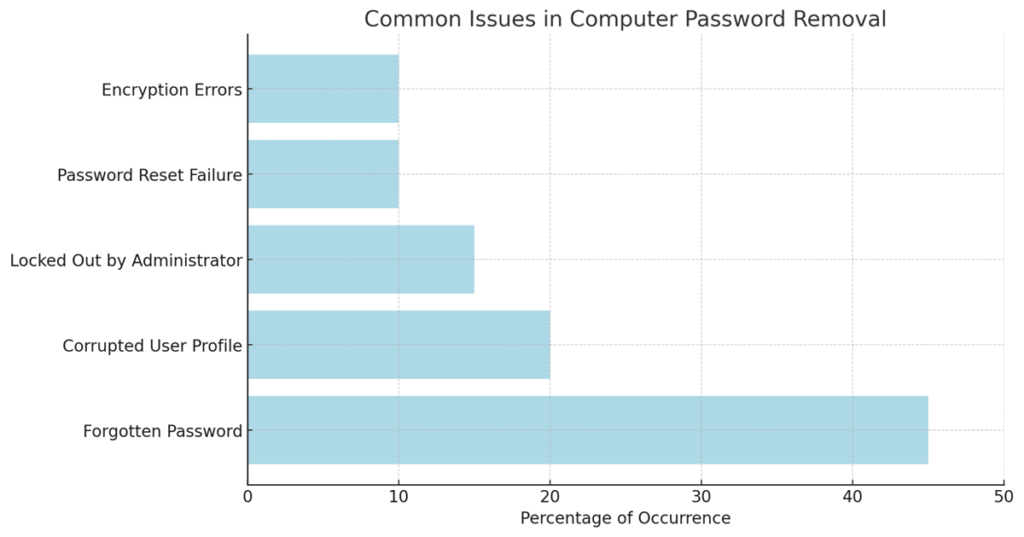
The chart showcases the most common issues encountered during computer password removal services. Forgotten passwords are by far the most prevalent issue, making up around 40% of the cases. Other frequent problems include locked-out administrator accounts and corrupted user profiles, both of which require specialized approaches to bypass or reset access.
At TN Computer Medics, we specialize in resolving these issues, whether you’re facing a forgotten password, admin account lockout, or password reset failures. Our experts use secure methods to help you regain access to your system quickly, without risking data loss.
If you’re dealing with any of these issues, TN Computer Medics is here to provide fast, reliable, and professional password removal services to get you back on track. Check out our 5-star Google Reviews from satisfied customers.
Frequently Asked Questions About Computer Password Removal
To remove a forgotten password from your computer, professional tools and methods are required. At TN Computer Medics, we use secure and efficient software to reset or bypass your password without losing any data. We’ll safely restore your access to the system.
Yes! Unlike a factory reset, which erases all your files, our password removal process ensures that your files, programs, and settings remain intact. We use advanced tools that reset or remove your password without affecting your data.
Yes, we offer password removal services for both Windows PCs and Mac computers. Whether you’re locked out of a MacBook Pro, iMac, or any other Apple device, we can help you regain access to your system securely without compromising your data.
Yes, resetting an administrator password is possible, even if you don’t know the current one. Our technicians use secure methods to either bypass or reset the admin password, allowing you to regain full access to your system.
The time required to remove or reset a password typically ranges from 30 minutes to 2 hours, depending on the complexity of the password issue. More complicated cases, such as BIOS password removal, may take longer. We always strive for fast and efficient service.
If your computer is asking for a password after a factory reset, it’s likely that a BIOS password or Windows password is still in place. We can help you bypass or reset the password and get your system back to normal operation.
Yes! You don’t need a password reset disk for us to remove a forgotten password. We have professional tools that allow us to safely reset or remove passwords even if a reset disk is not available.
If you’ve forgotten the answers to your security questions for password recovery, we can bypass this step and reset the password for you. We use trusted methods to regain access without needing to answer the security questions.
No, our password removal process is designed to preserve your computer’s settings and files. Unlike a factory reset, your documents, photos, and programs remain intact. We make sure your system is restored to its previous state while resetting the password.
If you are locked out of a company laptop or work device, we can help as long as you have the necessary authorization. We follow strict security protocols to ensure that all password removal procedures are safe and compliant with your company’s policies.
Contact TN Computer Medics for Fast, Secure Password Removal
Locked out of your computer? Don’t panic, TN Computer Medics can help you regain access quickly, securely, and without data loss. Our expert technicians will handle everything with precision, ensuring your system is restored to full functionality.
Contact us online or call us today at (615) 806-1535 to schedule your computer password removal service. Get back to work or play without the hassle of password problems! Our fast and reliable service ensures you won’t be locked out for long.
TN Computer Medics
Address: 732 N Jackson St, Tullahoma, TN 37388, United States
Phone Number: (615) 806-1535
Business Hours:
Monday: 8AM – 8PM
Tuesday: 8AM – 8PM
Wednesday: 8AM – 8PM
Thursday: 8AM – 8PM
Friday: 8AM – 8PM
Saturday: 8AM – 8PM
Sunday: 8AM – 8PM